
Measure Distance Between Point Clouds#
Download Python source code | Download Jupyter notebook
Color a point cloud by its distance to the nearest neighbors in a target cloud.
Uses pyvista.DataSet.find_closest_point().
import numpy as np
import pyvista as pv
from pyvista import examples
Compute Nearest-Neighbor Distances#
Query the target cloud for each source point and color the source by the resulting distances.
closest_ids = np.array([target.find_closest_point(point) for point in source.points])
closest_points = target.points[closest_ids]
source['distance'] = np.linalg.norm(source.points - closest_points, axis=1)

connector_ids = np.linspace(0, source.n_points - 1, 20, dtype=int)
segments = np.vstack(
    [np.vstack((source.points[i], closest_points[i])) for i in connector_ids],
)
connectors = pv.line_segments_from_points(segments)

pl = pv.Plotter()
pl.add_points(
    target,
    color='lightgray',
    point_size=10,
    render_points_as_spheres=True,
    opacity=0.6,
)
pl.add_points(
    source,
    scalars='distance',
    cmap='viridis',
    point_size=12,
    render_points_as_spheres=True,
)
pl.add_mesh(connectors, color='black', opacity=0.35)
pl.camera_position = pv.CameraPosition(
    position=(0.4, -0.5, 0.25),
    focal_point=source.center,
    viewup=(0, 0, 1),
)
pl.show()
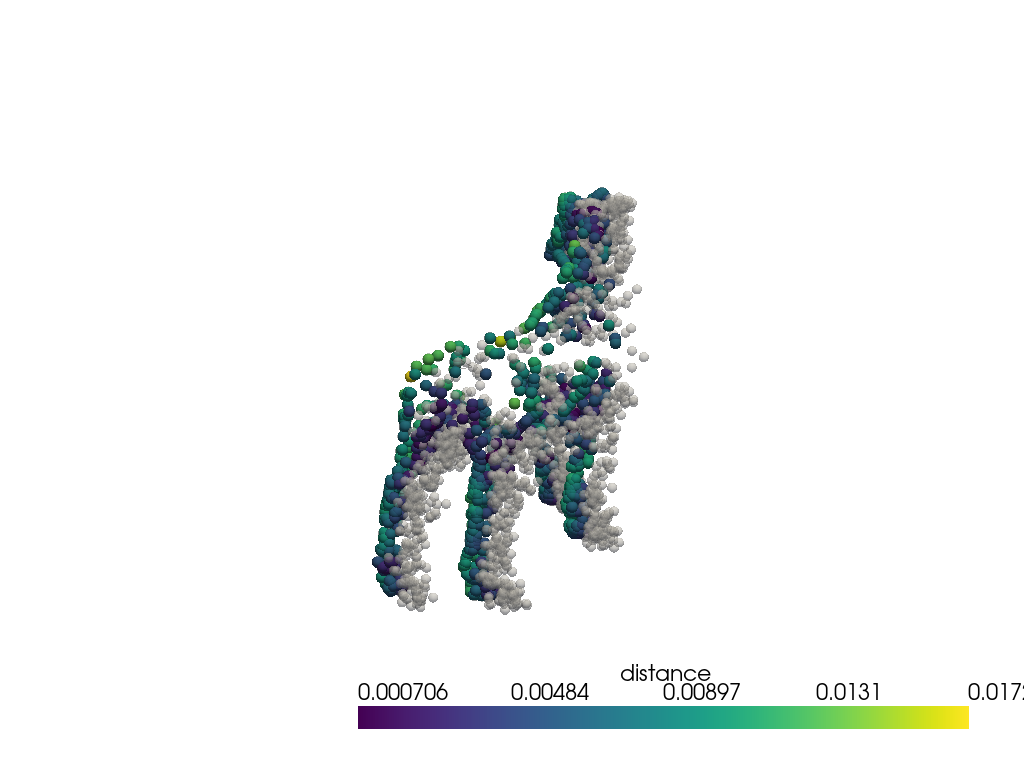
Inspect the Distance Range#
The clouds are close but not identical.
(np.float64(0.0007055426416401114), np.float64(0.017225263992428748))
Total running time of the script: (0 minutes 0.301 seconds)
