
download_owl#
- download_owl(*, load: bool = True, high_resolution: bool = False) PolyData | str[source]#
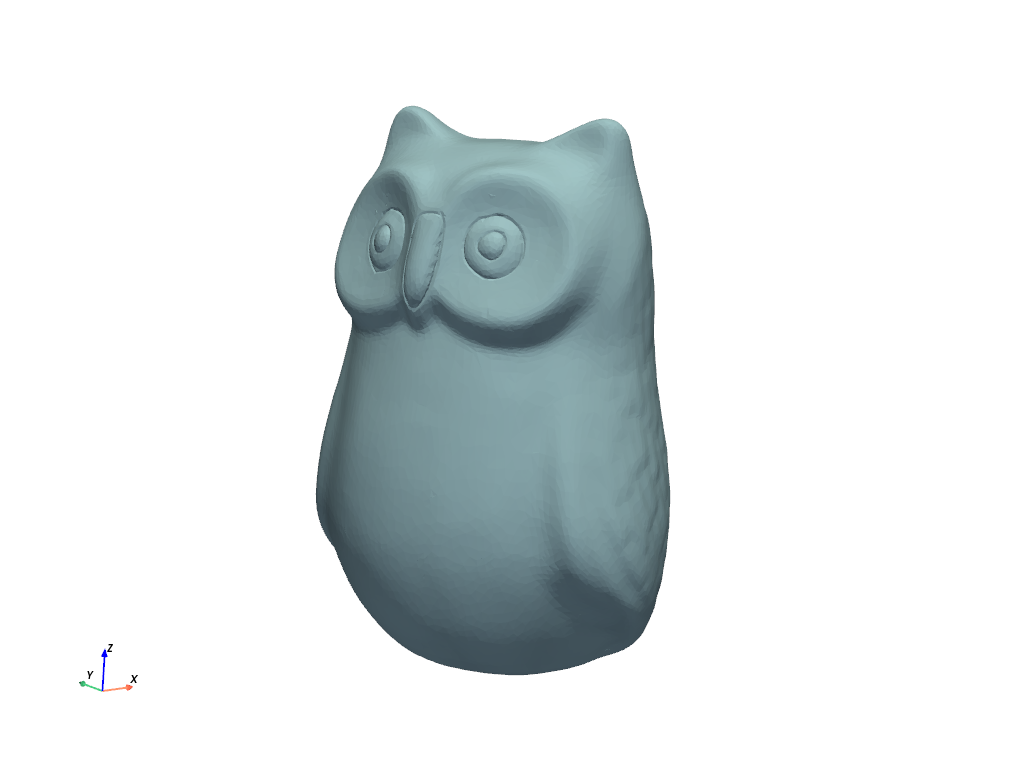
Download a scan of an owl statue created by Ivan Nikolov.
The dataset was downloaded from GGG-BenchmarkSfM: Dataset for Benchmarking Close-range SfM Software Performance under Varying Capturing Conditions
Original datasets are under the CC BY 4.0 license.
For more details, see Ivan Nikolov Datasets
Changed in version 0.45: A decimated version of this dataset with 24 thousand cells is now returned. Previously, a high-resolution version with 2.4 million cells was returned. Use
high_resolution=Truefor the high-resolution version.- Parameters:
- loadbool, default:
True Load the dataset after downloading it when
True. Set this toFalseand only the filename will be returned.- high_resolutionbool, default:
False Set this to
Trueto return a high-resolution version of this dataset. By default, adecimatedversion is returned with 99% reduction.Added in version 0.45.
- loadbool, default:
- Returns:
- output
pyvista.PolyData|str DataSet or filename depending on
load.
- output
Examples#
Download Python source code | Download Jupyter notebook
Download and plot the dataset.
>>> from pyvista import examples
>>> import pyvista as pv
>>> mesh = examples.download_owl()
>>> cpos = pv.CameraPosition(
...     position=(-315.2, -402.2, 230.7),
...     focal_point=(6.06, -1.74, 101.5),
...     viewup=(0.108, 0.226, 0.968),
... )
>>> mesh.plot(cpos=cpos)
Return the statistics of the dataset.
>>> mesh
PolyData (...)
  N Cells:    24407
  N Points:   12442
  N Strips:   0
  X Bounds:   -5.834e+01, 7.048e+01
  Y Bounds:   -7.005e+01, 6.657e+01
  Z Bounds:   1.814e+00, 2.013e+02
  N Arrays:   0
See Also#
- Owl Dataset
See this dataset in the Dataset Gallery for more info.
