
CubeAxesActor#
- class CubeAxesActor(*args, **kwargs)[source]#
Wrap vtkCubeAxesActor.
This class is created to wrap vtkCubeAxesActor, which is used to draw axes and labels for the input data bounds. This wrapping aims to provide a user-friendly interface to use vtkCubeAxesActor.
Changed in version 0.49: The bounds, colors, fonts, grid lines, and axis placement are now set by the constructor, using the same defaults as
show_bounds(). Previously these were only applied to actors created by that method, and an actor created directly used VTK’s defaults instead.- Parameters:
- camera
pyvista.Camera Camera to link to the axes actor.
- minor_ticksbool, default:
False If
True, also plot minor ticks on all axes.- tick_location
str, optional Set how the ticks are drawn on the axes grid. Options include:
'inside', 'outside', 'both'.- x_title
str, default: “X Axis” Title of the x-axis.
- y_title
str, default: “Y Axis” Title of the y-axis.
- z_title
str, default: “Z Axis” Title of the z-axis.
- x_axis_visibilitybool, default:
True Visibility of the x-axis.
- y_axis_visibilitybool, default:
True Visibility of the y-axis.
- z_axis_visibilitybool, default:
True Visibility of the z-axis.
- x_label_format
str, optional A format string defining how tick labels are generated from tick positions for the x-axis. Defaults to the theme format if set, otherwise
'{0:.1f}'.- y_label_format
str, optional A format string defining how tick labels are generated from tick positions for the y-axis. Defaults to the theme format if set, otherwise
'{0:.1f}'.- z_label_format
str, optional A format string defining how tick labels are generated from tick positions for the z-axis. Defaults to the theme format if set, otherwise
'{0:.1f}'.- x_label_visibilitybool, default:
True The visibility of the x-axis labels.
- y_label_visibilitybool, default:
True The visibility of the y-axis labels.
- z_label_visibilitybool, default:
True The visibility of the z-axis labels.
- n_xlabels
int, default: 5 At most this many labels along the x-axis. Where VTK’s own tick spacing fits the range, the labels sit on those ticks and the last may stop short of the upper bound; otherwise fewer are spaced evenly between the bounds.
- n_ylabels
int, default: 5 At most this many labels along the y-axis. Where VTK’s own tick spacing fits the range, the labels sit on those ticks and the last may stop short of the upper bound; otherwise fewer are spaced evenly between the bounds.
- n_zlabels
int, default: 5 At most this many labels along the z-axis. Where VTK’s own tick spacing fits the range, the labels sit on those ticks and the last may stop short of the upper bound; otherwise fewer are spaced evenly between the bounds.
- color
ColorLike, optional Color of all labels, axis titles, axis lines, and grid lines. Defaults to
pyvista.global_theme.font.color.Added in version 0.49.
- gridbool |
str, optional Add grid lines to the backface (
True,'back', or'backface') or to the frontface ('front','frontface') of the axes actor.Added in version 0.49.
- location
str, default: “closest” Set how the axes are drawn: either static (
'all'), closest triad ('front','closest','default'), furthest triad ('back','furthest'), static closest to the origin ('origin'), or outer edges ('outer') in relation to the camera position.Added in version 0.49.
- font_size
float, optional Size of the label font. Defaults to
pyvista.global_theme.font.size.Added in version 0.49.
- font_family
str, optional Font family. Must be either
'courier','times', or'arial'. Defaults topyvista.global_theme.font.family.Added in version 0.49.
- boldbool, default:
True Bold the axis labels and titles.
Added in version 0.49.
- use_3d_textbool, optional
Use vtkTextActor3D for titles and labels. Defaults to
Falsefor VTK 9.6 and later, andTruefor older versions of VTK.Warning
Setting
use_3d_text=Trueis not recommended with VTK 9.6.0 or later since the 3D labels may not render at all in some cases. This is a known VTK bug: https://gitlab.kitware.com/vtk/vtk/-/issues/19729.Added in version 0.49.
- use_2d_modebool, default:
False Use the 2D render mode. This can be enabled for smoother plotting. VTK also hides the z-axis in this mode, so it suits a scene viewed down a single axis.
Added in version 0.49.
- boundssequence[
float], optional Bounds of the axes in the form
(x_min, x_max, y_min, y_max, z_min, z_max). Defaults to the unit cube.Added in version 0.49.
- axes_rangessequence[
float], optional Values shown on the axes in the form
(x_min, x_max, y_min, y_max, z_min, z_max). These override the values derived frombounds.Added in version 0.49.
- padding
float, default: 0.0 Percent padding applied to
boundsalong each axial direction to cushion the datasets in the scene from the axes annotations.Added in version 0.49.
- camera
Examples#
Download Python source code | Download Jupyter notebook
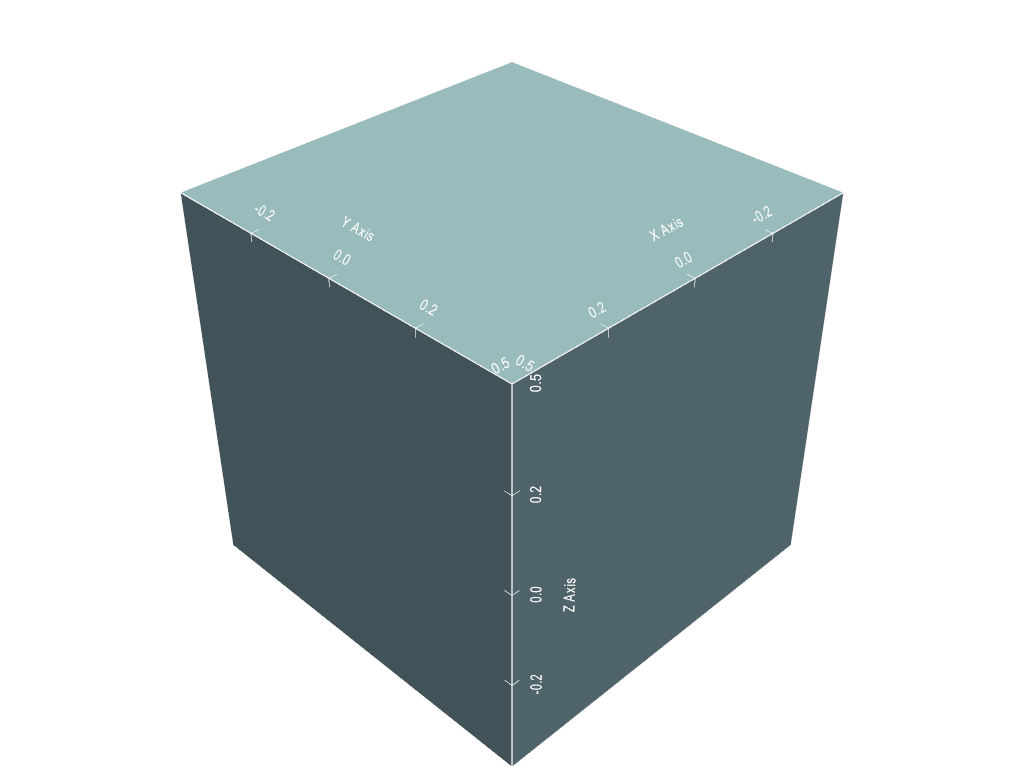
Create a 3D plotter and add a CubeAxesActor to it.
>>> import pyvista as pv
>>> mesh = pv.Cube()
>>> pl = pv.Plotter()
>>> actor = pl.add_mesh(mesh)
>>> cube_axes_actor = pv.CubeAxesActor(pl.camera)
>>> cube_axes_actor.bounds = mesh.bounds
>>> actor, property = pl.add_actor(cube_axes_actor)
>>> pl.show()
See Also#
Used In#
Gallery Examples
Inheritance#
Inherited members are documented on _NameMixin, _BoundsSizeMixin.
See them all under Inherited Attributes.
Wraps vtkCubeAxesActor.
Attributes#
Return or set the bounding box. |
|
Return or set the camera that performs scaling and translation. |
|
Return the center. |
|
Return or set the distance between labels and the axis. |
|
Number of labels on the x-axis. |
|
Number of labels on the y-axis. |
|
Number of labels on the z-axis. |
|
Return or set how the ticks are drawn on the axes grid. |
|
Return or set the distance between title and labels. |
|
Use the 2d render mode. |
|
Return or set visibility of the x-axis minor tick. |
|
Return or set the x-axis range. |
|
Return or set the visibility of the x-axis. |
|
Return or set the label of the x-axis. |
|
Return or set the visibility of the x-axis labels. |
|
Return the x-axis labels. |
|
Return or set the title of the x-axis. |
|
Return or set visibility of the y-axis minor tick. |
|
Return or set the y-axis range. |
|
Return or set the visibility of the y-axis. |
|
Return or set the label of the y-axis. |
|
Return or set the visibility of the y-axis labels. |
|
Return the y-axis labels. |
|
Return or set the title of the y-axis. |
|
Return or set visibility of the z-axis minor tick. |
|
Return or set the z-axis range. |
|
Return or set the visibility of the y-axis. |
|
Return or set the label of the z-axis. |
|
Return or set the visibility of the z-axis labels. |
|
Return the z-axis labels. |
|
Return or set the title of the z-axis. |
Inherited Attributes#
Return the size of each axis of the object’s bounding box. |
|
Get or set the unique name identifier used by PyVista. |
Methods#
|
Update the bounds of this actor. |
