Property.roughness#
- property Property.roughness: float[source]#
Return or set roughness.
Default
pyvista.plotting.themes._LightingConfig.roughness.This requires that the
interpolationbe set to'Physically based rendering'.Property has range
[0.0, 1.0]. A value of0.0is glossy and1.0is rough.
Examples#
Download Python source code | Download Jupyter notebook
Get the default roughness value.
>>> import pyvista as pv
>>> prop = pv.Property()
>>> prop.roughness
0.5
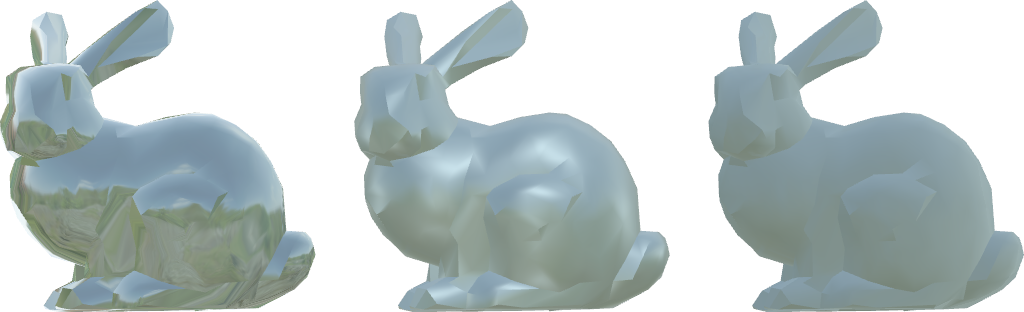
Visualize roughness at 0.0, 0.5, and 1.0 from left to right
with metallic of 0.5 and physically based rendering.
>>> from pyvista import examples
>>> mesh = examples.download_bunny_coarse()
>>> pl = pv.Plotter()
>>> for i, roughness in enumerate([0.0, 0.5, 1.0]):
...     actor = pl.add_mesh(mesh.translate((0.35 * i, 0, 0)))
...     actor.prop.interpolation = 'pbr'
...     actor.prop.metallic = 0.5
...     actor.prop.roughness = roughness
>>> pl.set_environment_texture(examples.download_sky_box_cube_map())
>>> pl.camera_position = 'xy'
>>> pl.camera.zoom('tight')
>>> pl.show()