Plotter.enable_hidden_line_removal#
- Plotter.enable_hidden_line_removal(*, all_renderers: bool = True) → None[source]#
Enable hidden line removal.
Wireframe geometry will be drawn using hidden line removal if the rendering engine supports it.
Disable this with
disable_hidden_line_removal.
Examples#
Download Python source code | Download Jupyter notebook
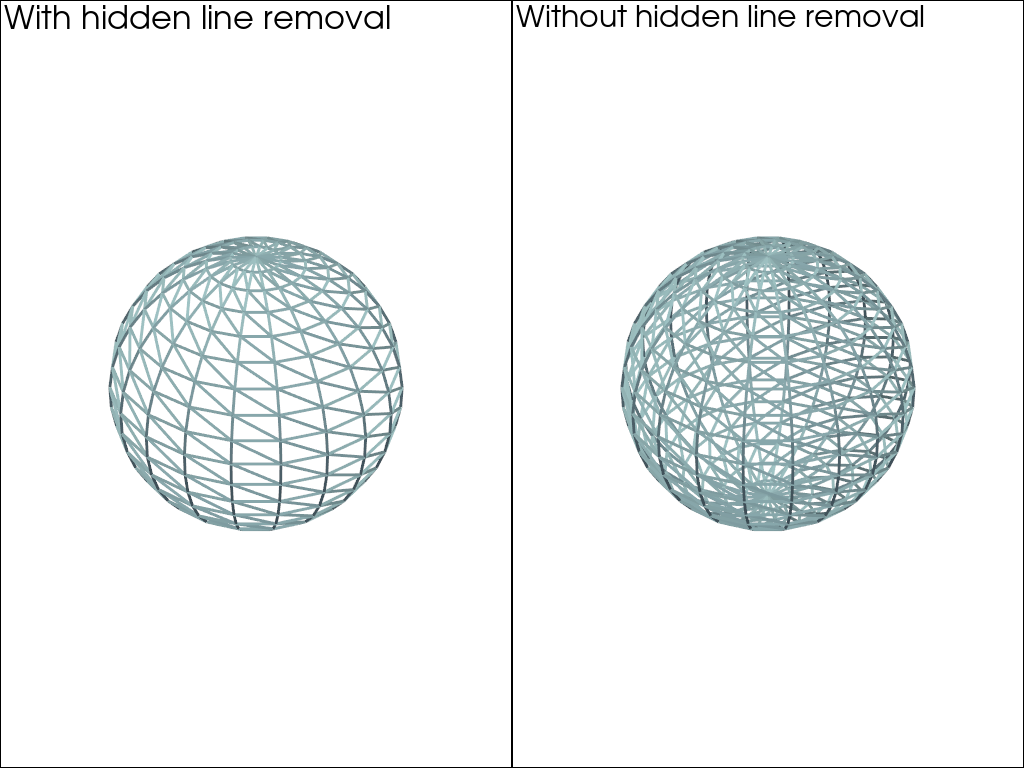
Create a side-by-side plotter and render a sphere in wireframe with hidden line removal enabled on the left and disabled on the right.
>>> import pyvista as pv
>>> sphere = pv.Sphere(theta_resolution=20, phi_resolution=20)
>>> pl = pv.Plotter(shape=(1, 2))
>>> _ = pl.add_mesh(sphere, line_width=3, style='wireframe')
>>> _ = pl.add_text('With hidden line removal')
>>> pl.enable_hidden_line_removal(all_renderers=False)
>>> pl.subplot(0, 1)
>>> pl.disable_hidden_line_removal(all_renderers=False)
>>> _ = pl.add_mesh(sphere, line_width=3, style='wireframe')
>>> _ = pl.add_text('Without hidden line removal')
>>> pl.show()
Used In#
API Examples
Gallery Examples