
LagrangeWedge#
- LagrangeWedge(*, cell_order: int = 3) UnstructuredGrid[source]#
Create a
pyvista.UnstructuredGridcontaining a single Lagrange wedge.This cell corresponds to the
pyvista.CellType.LAGRANGE_WEDGEcell type.- Parameters:
- cell_order
int, default: 3 Order of interpolation to use.
- cell_order
- Returns:
pyvista.UnstructuredGridUnstructuredGrid containing a single Lagrange wedge.
Examples#
Download Python source code | Download Jupyter notebook
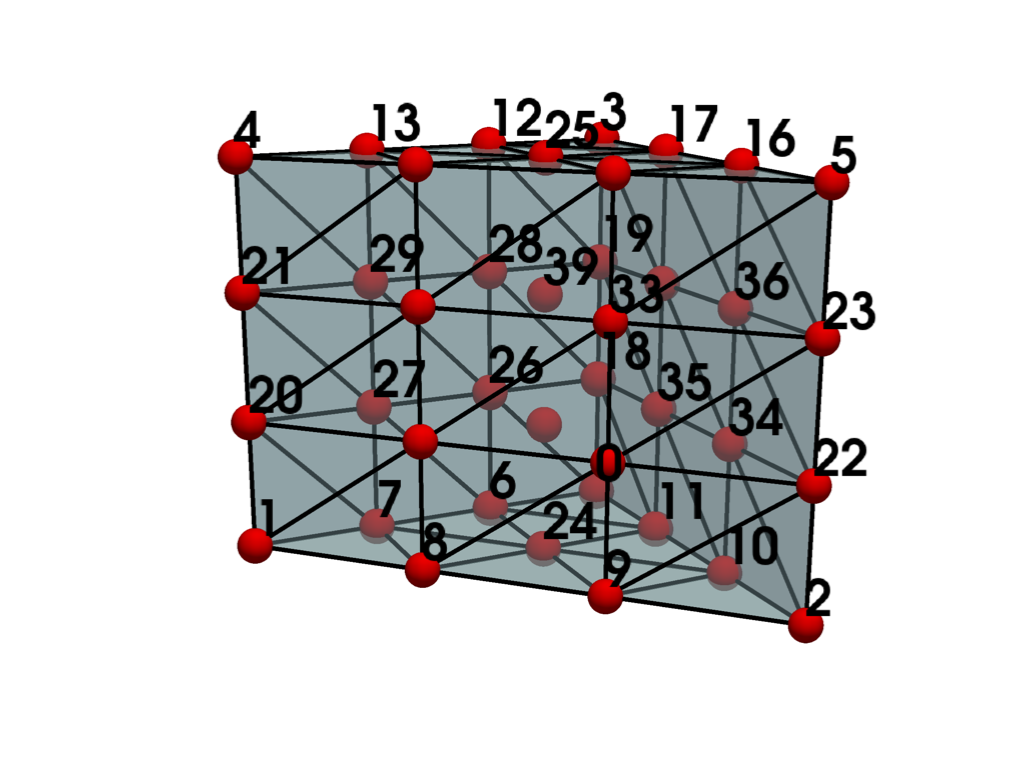
Create and plot a single Lagrange wedge.
>>> from pyvista import examples
>>> grid = examples.cells.LagrangeWedge()
>>> examples.plot_cell(grid)
List the grid’s cells.
>>> grid.cells
array([40,  0,  1,  2,  3,  4,  5,  6,  7,  8,  9, 10, 11, 12, 13, 14, 15,
       16, 17, 18, 19, 20, 21, 22, 23, 24, 25, 26, 27, 28, 29, 30, 31, 32,
       33, 34, 35, 36, 37, 38, 39]...)
List the grid’s points.
>>> grid.points
pyvista_ndarray([[0.        , 0.        , 0.        ],
                 [1.        , 0.        , 0.        ],
                 [0.        , 1.        , 0.        ],
                 [0.        , 0.        , 1.        ],
                 [1.        , 0.        , 1.        ],
                 [0.        , 1.        , 1.        ],
                 [0.33333334, 0.        , 0.        ],
                 [0.66666669, 0.        , 0.        ],
                 [0.66666669, 0.33333334, 0.        ],
                 [0.33333334, 0.66666669, 0.        ],
                 [0.        , 0.66666669, 0.        ],
                 [0.        , 0.33333334, 0.        ],
                 [0.33333334, 0.        , 1.        ],
                 [0.66666669, 0.        , 1.        ],
                 [0.66666669, 0.33333334, 1.        ],
                 [0.33333334, 0.66666669, 1.        ],
                 [0.        , 0.66666669, 1.        ],
                 [0.        , 0.33333334, 1.        ],
                 [0.        , 0.        , 0.33333334],
                 [0.        , 0.        , 0.66666669],
                 [1.        , 0.        , 0.33333334],
                 [1.        , 0.        , 0.66666669],
                 [0.        , 1.        , 0.33333334],
                 [0.        , 1.        , 0.66666669],
                 [0.33333334, 0.33333334, 0.        ],
                 [0.33333334, 0.33333334, 1.        ],
                 [0.33333334, 0.        , 0.33333334],
                 [0.66666669, 0.        , 0.33333334],
                 [0.33333334, 0.        , 0.66666669],
                 [0.66666669, 0.        , 0.66666669],
                 [0.66666669, 0.33333334, 0.33333334],
                 [0.33333334, 0.66666669, 0.33333334],
                 [0.66666669, 0.33333334, 0.66666669],
                 [0.33333334, 0.66666669, 0.66666669],
                 [0.        , 0.66666669, 0.33333334],
                 [0.        , 0.33333334, 0.33333334],
                 [0.        , 0.66666669, 0.66666669],
                 [0.        , 0.33333334, 0.66666669],
                 [0.33333334, 0.33333334, 0.33333334],
                 [0.33333334, 0.33333334, 0.66666669]])
>>> grid.celltypes  # same as pyvista.CellType.LAGRANGE_WEDGE
array([73], dtype=uint8)
