Actor.enable_maximum_intensity_projection#
- Actor.enable_maximum_intensity_projection(clim: Sequence[float] | None = None) None[source]#
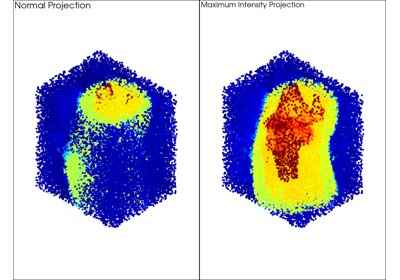
Enable maximum intensity projection.
Added in version 0.48.
This resets the z screen coordinates so that vertices with higher scalar values are rendered closer to the screen, regardless of their actual 3D position. This is useful for dense point cloud visualization where high-value data points should be visible even when occluded by lower-value points.
Scalar values are normalized to the
[-1, 0]range to stay within the OpenGL clip space.- Parameters:
- Raises:
RuntimeErrorIf the VTK version is older than 9.3.
ValueErrorIf no mapper, dataset, or active scalars are available and
climis not provided.
Warning
Requires VTK >= 9.3. The vertex shader replacements used by this method are not supported in older VTK versions.
Maximum Intensity Projection does not work correctly with
opacity < 1unless depth peeling is enabled. Seepyvista.Plotter.enable_depth_peeling().
References#
Cowan, E.J., 2014. ‘X-ray Plunge Projection’ - Understanding Structural Geology from Grade Data. AusIMM Monograph 30: Mineral Resource and Ore Reserve Estimation - The AusIMM Guide to Good Practice, second edition, 207-220.
Examples#
Download Python source code | Download Jupyter notebook
Enable maximum intensity projection on a point cloud actor.
>>> import numpy as np
>>> import pyvista as pv
>>> rng = np.random.default_rng(0)
>>> cloud = pv.PolyData(rng.random((1000, 3)))
>>> cloud['values'] = cloud.points[:, 2]
>>> pl = pv.Plotter()
>>> actor = pl.add_mesh(cloud, scalars='values', style='points')
>>> actor.enable_maximum_intensity_projection()
Used In#
API Examples
Gallery Examples