
Texture#
- class Texture(*args, **kwargs)[source]#
Wrap vtkTexture.
Textures can be used to apply images to surfaces, as in the case of Applying Textures.
They can also be used for environment textures to affect the lighting of the scene, or even as a environment cubemap as in the case of Physically Based Rendering and 3D Earth and Celestial Bodies.
Changed in version 0.47: All textures now use
'direct'color_modeby default.- Parameters:
- uinput
str|numpy.ndarray| vtkImageData | vtkTexture | sequence, optional Filename, vtkImageData, vtkTexture,
numpy.ndarrayor a sequence of images to create a cubemap. If a sequence of images, must be of the same size and in the following order:+X
-X
+Y
-Y
+Z
-Z
- **kwargs
dict, optional Optional arguments when reading from a file. Generally unused.
- uinput
Examples#
Download Python source code | Download Jupyter notebook
Load a texture from file. File should be a “image” or “image-like” file.
>>> from pathlib import Path
>>> import pyvista as pv
>>> from pyvista import examples
>>> path = examples.download_masonry_texture(load=False)
>>> Path(path).name
'masonry.bmp'
>>> texture = pv.Texture(path)
>>> texture
Texture (...)
  Components:   3
  Cube Map:     False
  Dimensions:   256, 256
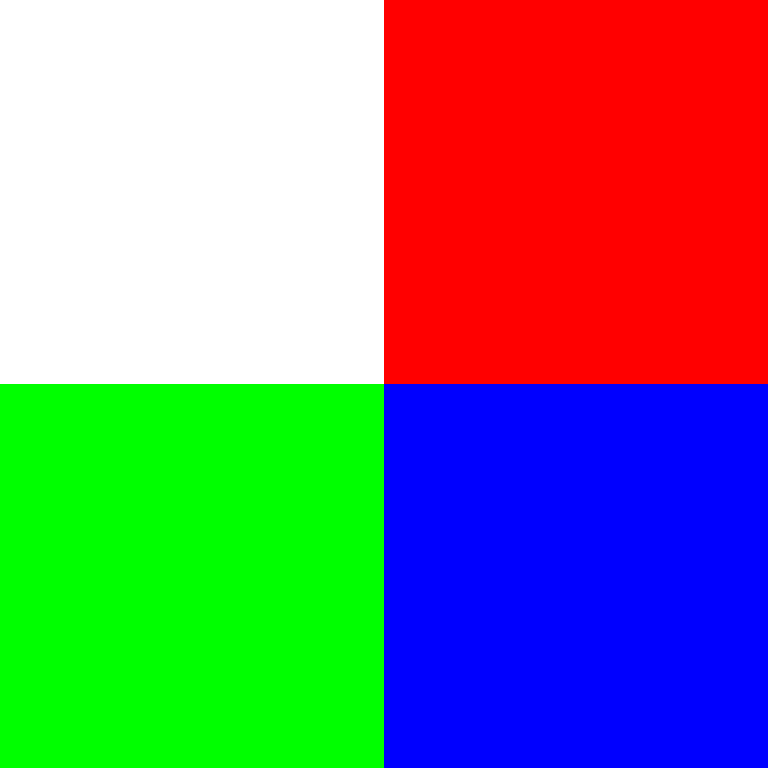
Create a texture from an RGB array. Note how this is colored per “point” rather than per “pixel”.
>>> import numpy as np
>>> arr = np.array(
...     [
...         [255, 255, 255],
...         [255, 0, 0],
...         [0, 255, 0],
...         [0, 0, 255],
...     ],
...     dtype=np.uint8,
... )
>>> arr = arr.reshape((2, 2, 3))
>>> texture = pv.Texture(arr)
>>> texture.plot()
Create a cubemap from 6 images.
>>> px = examples.download_sky(direction='posx')
>>> nx = examples.download_sky(direction='negx')
>>> py = examples.download_sky(direction='posy')
>>> ny = examples.download_sky(direction='negy')
>>> pz = examples.download_sky(direction='posz')
>>> nz = examples.download_sky(direction='negz')
>>> texture = pv.Texture([px, nx, py, ny, pz, nz])
>>> texture.cube_map
True
Used In#
API Examples
Plotter.screenshot(1 use)Texture.is_empty(1 use)
Gallery Examples

Inheritance#
Inherited members are documented on DataObject.
See them all under Inherited Attributes and Inherited Methods.
Wraps vtkTexture.
Attributes#
Return or set the color mode. |
|
Return |
|
Dimensions of the texture. |
|
Return if interpolate is enabled or disabled. |
|
Return |
|
Return if mipmap is enabled or disabled. |
|
Return the number of components in the image. |
|
Repeat the texture. |
|
Return or set the Wrap mode for the texture coordinates. |
Inherited Attributes#
Return the actual size of the dataset object. |
|
Return FieldData as DataSetAttributes. |
|
Get address of the underlying VTK C++ object. |
|
Set or return a user-specified data dictionary. |
Methods#
|
Make a copy of this texture. |
Flip the texture in the x direction. |
|
Flip the texture in the y direction. |
|
|
Get the min and max of a named array of the texture's image. |
|
Plot the texture as an image. |
Rotate this texture 90 degrees counter-clockwise. |
|
Rotate this texture 90 degrees clockwise. |
|
Return the texture as an array. |
|
Convert this texture as a single component (grayscale) texture. |
|
Return the texture as an image. |
|
|
Return the texture as a vtkSkybox. |
Inherited Methods#
Add field data. |
|
Convert this |
|
Remove all field data. |
|
Copy the data attributes of the input dataset object. |
|
Copy pyvista meta data onto this object from another object. |
|
Copy the structure (geometry and topology) of the input dataset object. |
|
Overwrite this data object with another data object as a deep copy. |
|
Return the header stats of this dataset. |
|
Save this vtk object to file. |
|
Shallow copy the given mesh to this mesh. |
