
Transform#
- class Transform(*args, **kwargs)[source]#
Describes linear transformations via a 4x4 matrix.
A
Transformcan be used to describe the full range of linear (also known as affine) coordinate transformations in three dimensions, which are internally represented as a 4x4 homogeneous transformation matrix.The transformation methods (for example,
translate(),rotate(),compose()) can operate in eitherpre_multiply()orpost_multiply()mode. In pre-multiply mode, any additional transformations will occur before any transformations represented by the currentmatrix. In post-multiply mode (the default), the additional transformation will occur after any transformations represented by the current matrix.Note
This class performs all of its operations in a right-handed coordinate system with right-handed rotations. Some other graphics libraries use left-handed coordinate systems and rotations.
Added in version 0.45.
- Parameters:
- trans
TransformLike|Sequence[TransformLike], optional Initialize the transform with a transformation or sequence of transformations. By default, the transform is initialized as the identity matrix.
- point
VectorLikeFloat, optional Point to use when composing transformations. If set, two additional transformations are composed and added to the
matrix_list:translate()topointbefore the transformationtranslate()away frompointafter the transformation
By default, this value is
None, which means that the scale, rotation, etc. transformations are performed about the origin(0, 0, 0).- multiply_mode‘pre’ | ‘post’, optional
Multiplication mode to use when composing. Set this to
'pre'for pre-multiplication or'post'for post-multiplication.
- trans
Examples#
Download Python source code | Download Jupyter notebook
Create a transformation and use + to compose a translation.
>>> import numpy as np
>>> import pyvista as pv
>>> position = (-0.6, -0.8, 2.1)
>>> translation_T = pv.Transform() + position
>>> translation_T.matrix
array([[ 1. ,  0. ,  0. , -0.6],
       [ 0. ,  1. ,  0. , -0.8],
       [ 0. ,  0. ,  1. ,  2.1],
       [ 0. ,  0. ,  0. ,  1. ]])
Using + performs the same concatenation as calling translate().
>>> np.array_equal(
...     translation_T.matrix, pv.Transform().translate(position).matrix
... )
True
Create a transformation and use * to compose a scaling matrix.
>>> scale_factor = 2.0
>>> scaling_T = pv.Transform() * scale_factor
>>> scaling_T.matrix
array([[2., 0., 0., 0.],
       [0., 2., 0., 0.],
       [0., 0., 2., 0.],
       [0., 0., 0., 1.]])
Using * performs the same concatenation as calling scale().
>>> np.array_equal(scaling_T.matrix, pv.Transform().scale(scale_factor).matrix)
True
Compose the two transformations using *. This will compose with
post-multiplication such that the transformations are applied in order from left to
right, that is, translate first, then scale.
>>> transform_post = translation_T * scaling_T
>>> transform_post.matrix
array([[ 2. ,  0. ,  0. , -1.2],
       [ 0. ,  2. ,  0. , -1.6],
       [ 0. ,  0. ,  2. ,  4.2],
       [ 0. ,  0. ,  0. ,  1. ]])
Post-multiplication is equivalent to using matrix multiplication on the arrays directly but with the arguments reversed:
>>> mat_mul = scaling_T.matrix @ translation_T.matrix
>>> np.array_equal(transform_post.matrix, mat_mul)
True
Alternatively, compose the transformations by chaining the methods with a
single Transform instance. Note that post-multiply is used by default.
>>> transform_post = pv.Transform()
>>> transform_post.multiply_mode
'post'
>>> _ = transform_post.translate(position).scale(scale_factor)
>>> transform_post.matrix
array([[ 2. ,  0. ,  0. , -1.2],
       [ 0. ,  2. ,  0. , -1.6],
       [ 0. ,  0. ,  2. ,  4.2],
       [ 0. ,  0. ,  0. ,  1. ]])
Use n_transformations to check that there are two transformations.
Use matrix_list to get a list of the transformations. Since
post-multiplication is used, the translation matrix is first in the list since
it was applied first, and the scale matrix is second.
>>> transform_post.matrix_list[0]  # translation
array([[ 1. ,  0. ,  0. , -0.6],
       [ 0. ,  1. ,  0. , -0.8],
       [ 0. ,  0. ,  1. ,  2.1],
       [ 0. ,  0. ,  0. ,  1. ]])
>>> transform_post.matrix_list[1]  # scaling
array([[2., 0., 0., 0.],
       [0., 2., 0., 0.],
       [0., 0., 2., 0.],
       [0., 0., 0., 1.]])
Create a similar transform but use pre-multiplication this time. Compose the
transformations in the same order as before using translate() and scale().
>>> transform_pre = pv.Transform().pre_multiply()
>>> _ = transform_pre.translate(position).scale(scale_factor)
This is equivalent to using matrix multiplication directly on the arrays:
>>> mat_mul = translation_T.matrix @ scaling_T.matrix
>>> np.array_equal(transform_pre.matrix, mat_mul)
True
Show the matrix list again. Note how the order with pre-multiplication is the reverse of post-multiplication.
>>> transform_pre.matrix_list[0]  # scaling
array([[2., 0., 0., 0.],
       [0., 2., 0., 0.],
       [0., 0., 2., 0.],
       [0., 0., 0., 1.]])
>>> transform_pre.matrix_list[1]  # translation
array([[ 1. ,  0. ,  0. , -0.6],
       [ 0. ,  1. ,  0. , -0.8],
       [ 0. ,  0. ,  1. ,  2.1],
       [ 0. ,  0. ,  0. ,  1. ]])
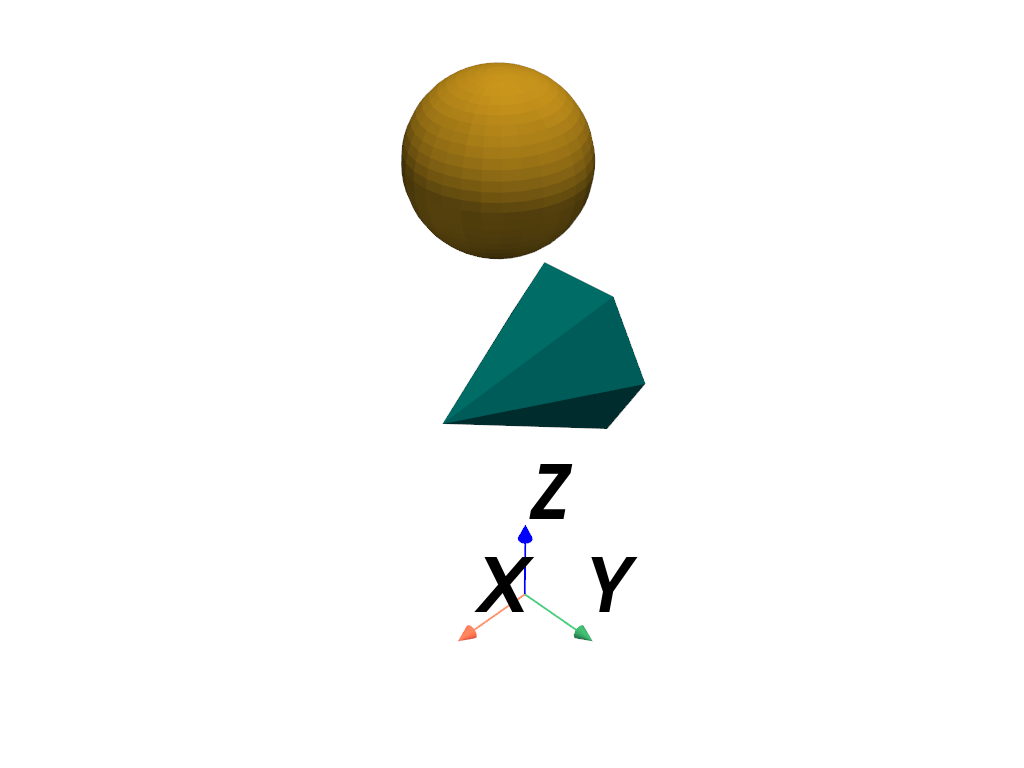
Apply the two post- and pre-multiplied transformations to a dataset and plot them. Note how the meshes have different positions since post- and pre-multiplication produce different transformations.
>>> mesh_post = pv.Sphere().transform(transform_post, inplace=False)
>>> mesh_pre = pv.Cone().transform(transform_pre, inplace=False)
>>> pl = pv.Plotter()
>>> _ = pl.add_mesh(mesh_post, color='goldenrod')
>>> _ = pl.add_mesh(mesh_pre, color='teal')
>>> _ = pl.add_axes_at_origin()
>>> pl.show()
Get the composed inverse transformation matrix of the pre-multiplication case.
>>> inverse_matrix = transform_pre.inverse_matrix
>>> inverse_matrix
array([[ 0.5 ,  0.  ,  0.  ,  0.3 ],
       [ 0.  ,  0.5 ,  0.  ,  0.4 ],
       [ 0.  ,  0.  ,  0.5 , -1.05],
       [ 0.  ,  0.  ,  0.  ,  1.  ]])
Similar to using matrix_list, we can inspect the individual transformation
inverses with inverse_matrix_list.
>>> transform_pre.inverse_matrix_list[0]  # inverse scaling
array([[0.5, 0. , 0. , 0. ],
       [0. , 0.5, 0. , 0. ],
       [0. , 0. , 0.5, 0. ],
       [0. , 0. , 0. , 1. ]])
>>> transform_pre.inverse_matrix_list[1]  # inverse translation
array([[ 1. ,  0. ,  0. ,  0.6],
       [ 0. ,  1. ,  0. ,  0.8],
       [ 0. ,  0. ,  1. , -2.1],
       [ 0. ,  0. ,  0. ,  1. ]])
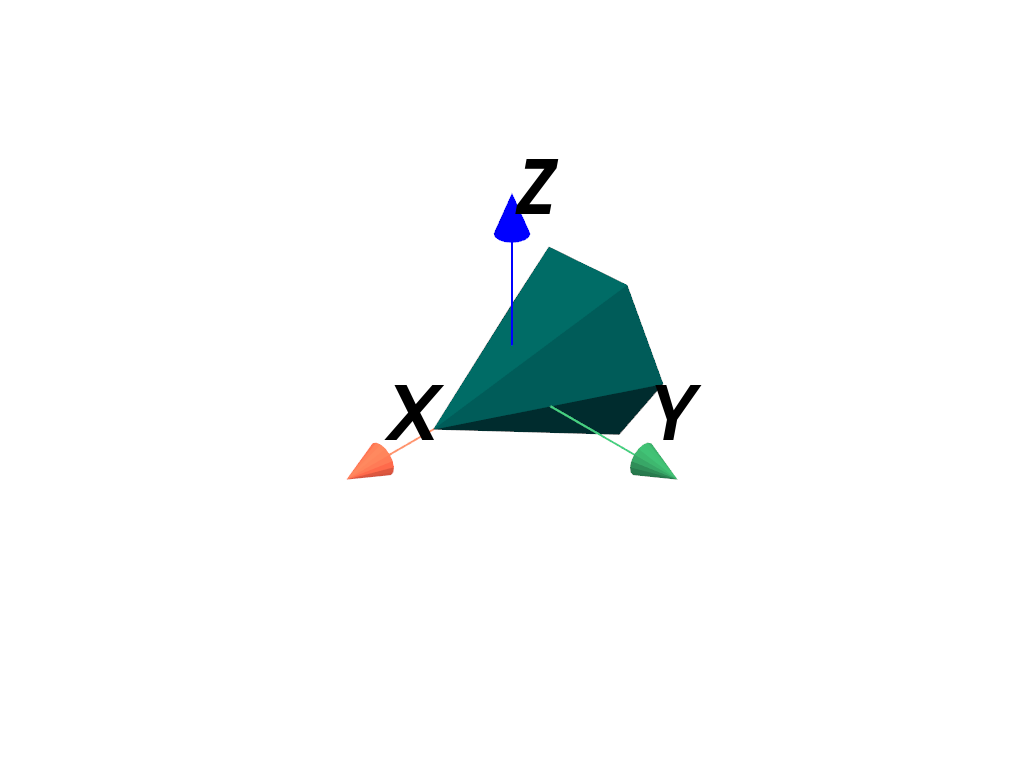
Transform the mesh by its inverse to restore it to its original un-scaled state and positioning at the origin.
>>> mesh_pre_inverted = mesh_pre.transform(inverse_matrix, inplace=False)
>>> pl = pv.Plotter()
>>> _ = pl.add_mesh(mesh_pre_inverted, color='teal')
>>> _ = pl.add_axes_at_origin()
>>> pl.show()
See Also#
pyvista.DataObjectFilters.transformApply a transformation to a mesh.
pyvista.Prop3D.transformTransform an actor.
Used In#
API Examples
DataSetFilters.align_xyz(1 use)DataSetFilters.oriented_bounding_box(1 use)ImageDataFilters.reslice(1 use)Text3D(1 use)Transform.apply(1 use)25 more
Transform.as_rotation(1 use)Transform.compose(1 use)Transform.copy(1 use)Transform.decompose(1 use)Transform.flip_x(1 use)Transform.flip_y(1 use)Transform.flip_z(1 use)Transform.identity(1 use)Transform.invert(1 use)Transform.post_multiply(1 use)Transform.pre_multiply(1 use)Transform.reflect(1 use)Transform.reflection(1 use)Transform.rotate(1 use)Transform.rotate_vector(1 use)Transform.rotate_x(1 use)Transform.rotate_y(1 use)Transform.rotate_z(1 use)Transform.rotation_axis_angle(1 use)Transform.rotation_matrix(1 use)Transform.scale(1 use)Transform.scale_factors(1 use)Transform.shear_matrix(1 use)Transform.translate(1 use)Transform.translation(1 use)
Gallery Examples
Inheritance#
Wraps vtkTransform.
Attributes#
Check that the |
|
Return |
|
Return |
|
Return |
|
Return |
|
Return |
|
Return the inverse of the current transformation |
|
Return a list of all inverse transformations applied by this |
|
Get the inverse flag of the transformation. |
|
Return or set the current transformation matrix. |
|
Return a list of all current transformation matrices. |
|
Set or get the multiplication mode. |
|
Return the current number of composed transformations. |
|
Point to use when composing some transformations such as scale, rotation, etc. |
|
Return the reflection component of the current transformation |
|
Return the rotation component of the current transformation |
|
Return the rotation component of the current transformation |
|
Return the scaling component of the current transformation |
|
Return the shear component of the current transformation |
|
Return the translation component of the current transformation |
Methods#
|
Apply the current transformation |
|
Apply the current transformation |
|
Apply the current transformation |
Apply the current transformation |
|
Apply the current transformation |
|
Return the rotation component as a SciPy |
|
|
Compose a transformation matrix. |
Return a deep copy of the transform. |
|
|
Decompose the current transformation into its components. |
|
Compose a reflection about the x-axis. |
|
Compose a reflection about the y-axis. |
|
Compose a reflection about the z-axis. |
Set the transformation to the identity transformation. |
|
Invert the current transformation. |
|
Set the multiplication mode to post-multiply. |
|
Set the multiplication mode to pre-multiply. |
|
|
Compose a reflection matrix. |
|
Compose a rotation matrix. |
|
Compose a rotation about a vector. |
|
Compose a rotation about the x-axis. |
|
Compose a rotation about the y-axis. |
|
Compose a rotation about the z-axis. |
|
Compose a scale matrix. |
|
Compose a translation matrix. |
