DataObjectFilters.sample#
- DataObjectFilters.sample(
- target: DataSet | MultiBlock[Any] | PartitionedDataSet | _vtk.vtkDataSet,
- *,
- tolerance: float | None = None,
- pass_cell_data: bool = True,
- pass_point_data: bool = True,
- categorical: bool = False,
- progress_bar: bool = False,
- locator: Literal['cell', 'cell_tree', 'obb_tree', 'static_cell'] | _vtk.vtkAbstractCellLocator | None = 'static_cell',
- pass_field_data: bool = True,
- mark_blank: bool = True,
- snap_to_closest_point: bool = False,
Resample array data from a passed mesh onto this mesh.
For
mesh1.sample(mesh2), the arrays frommesh2are sampled onto the points ofmesh1. This function interpolates within an enclosing cell. This contrasts withpyvista.DataSetFilters.interpolate()that uses a distance weighting for nearby points. If there is cell topology,sampleis usually preferred.The point data ‘vtkValidPointMask’ stores whether the point could be sampled with a value of 1 meaning successful sampling. And a value of 0 means unsuccessful.
This uses vtkResampleWithDataSet.
- Parameters:
- target
pyvista.DataSet|pyvista.MultiBlock|pyvista.PartitionedDataSet The vtk data object to sample from - point and cell arrays from this object are sampled onto the nodes of the
datasetmesh. A composite target is sampled block by block, keeping the first block to sample each point.- tolerance
float, optional Tolerance used to compute whether a point in the source is in a cell of the input. If not given, tolerance is automatically generated.
- pass_cell_databool, default:
True Preserve source mesh’s original cell data arrays.
- pass_point_databool, default:
True Preserve source mesh’s original point data arrays.
- categoricalbool, default:
False Control whether the target’s active point scalars are to be treated as categorical. If the data is categorical, then the resultant data will be determined by a nearest neighbor interpolation scheme. All other arrays are interpolated normally.
The target must have single-component point scalars. They are made active when the target has exactly one such array and none is active already. A composite target is sampled block by block, keeping the first block to sample each point, so every block needs them.
- progress_barbool, default:
False Display a progress bar to indicate progress.
- locatorvtkAbstractCellLocator or
strorNone, default: ‘static_cell’ Prototype cell locator to perform the
FindCell()operation. IfNone, uses the DataSetFindCellmethod. Valid strings with mapping to vtk cell locators are'cell'- vtkCellLocator'cell_tree'- vtkCellTreeLocator'obb_tree'- vtkOBBTree'static_cell'- vtkStaticCellLocator
Deprecated since version 0.50.0:
'obb_tree'is deprecated. vtkOBBTree does not implementFindCelland never accelerated sampling. It raises with VTK 9.7 and newer.- pass_field_databool, default:
True Preserve source mesh’s original field data arrays.
- mark_blankbool, default:
True Whether to mark blank points and cells in “vtkGhostType”.
- snap_to_closest_pointbool, default:
False Whether to snap to cell with closest point if no cell is found. Useful when sampling from data with vertex cells. Requires vtk >=9.3.0.
Added in version 0.43.
- target
- Returns:
- output
DataSet|MultiBlock Dataset containing resampled data. Return type matches input.
- output
- Raises:
TypeErrorIf
targetcannot be wrapped as a dataset or a composite of datasets.ValueErrorIf
categorical=Trueand the target has no single-component point scalars, if it has several and none is active, or iflocatoris a vtkOBBTree and VTK is 9.7 or newer.
Examples#
Download Python source code | Download Jupyter notebook
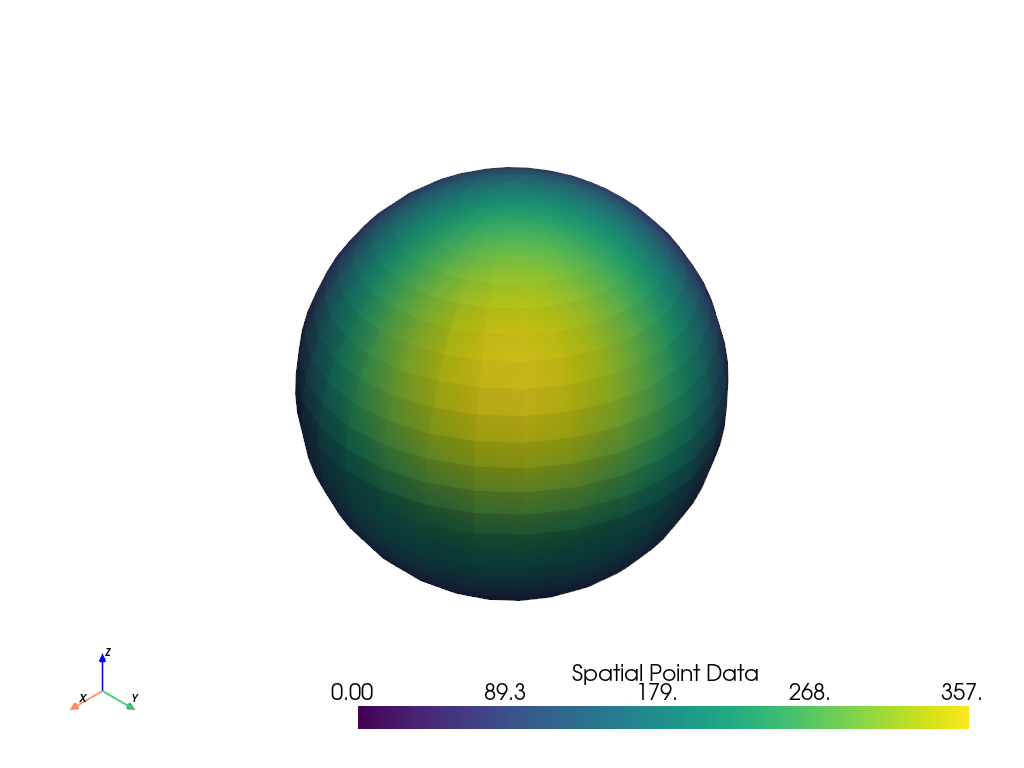
Resample data from another dataset onto a sphere.
>>> import pyvista as pv
>>> from pyvista import examples
>>> mesh = pv.Sphere(center=(4.5, 4.5, 4.5), radius=4.5)
>>> data_to_probe = examples.load_uniform()
>>> result = mesh.sample(data_to_probe)
>>> result.plot(scalars='Spatial Point Data')
If sampling from a set of points represented by a (n, 3)
shaped numpy.ndarray, they need to be converted to a
PyVista DataSet, for example, pyvista.PolyData, first.
>>> import numpy as np
>>> points = np.array([[1.5, 5.0, 6.2], [6.7, 4.2, 8.0]])
>>> mesh = pv.PolyData(points)
>>> result = mesh.sample(data_to_probe)
>>> result['Spatial Point Data']
pyvista_ndarray([ 46.5 , 225.12])
See Also#
pyvista.DataSetFilters.interpolateInterpolate values from one mesh onto another.
pyvista.DataObjectFilters.resample_to_imageSample onto a new
ImageDatawhich fits the input’s bounds, without building the image first.pyvista.ImageDataFilters.resampleResample image data to modify its dimensions and spacing.
pyvista.ImageDataFilters.resliceSample an image at the points of a reference image. Prefer it when both meshes are
ImageData: it returns the resampled array alone, and offers the border, interpolation, and anti-aliasing options images need.
Used In#
Gallery Examples