ImageDataFilters.reslice#
- ImageDataFilters.reslice(
- reference_image: ImageData,
- interpolation: _InterpolationOptions = 'nearest',
- *,
- transform: TransformLike | _vtk.vtkAbstractTransform | None = None,
- border_mode: _BorderModeOptions = 'clamp',
- background_value: float = 0.0,
- anti_aliasing: bool = False,
- scalars: str | None = None,
- preference: Literal['point', 'cell'] = 'point',
- inplace: bool = False,
- progress_bar: bool = False,
Sample the image at the points of a reference image.
The image is sampled at the physical position of each point of the
reference_image, so the two images are aligned in space. Thedimensions,spacing,origin,offset, anddirection_matrixof the output all match the reference.Use this filter to map an image onto the grid of another image, for example, to give two acquisitions of the same subject a common grid. Use
resample()instead to change the sampling density in the image’s own frame. Give the reference a rotateddirection_matrixto sample an oblique plane or volume, and pass atransformto move the image as it is sampled, so a registration result is applied in the same pass.This filter may be used to reslice either point or cell data. Cell data is sampled at the cell centers of the reference image.
Note
Reference points which are outside the image are filled with
background_value. Only points inside the image are interpolated, soborder_modeapplies to the image’s own boundary.Added in version 0.50.
- Parameters:
- reference_image
ImageData Image defining the points to sample at. Its geometry is matched exactly by the output.
- interpolation‘nearest’, ‘linear’, ‘cubic’, ‘lanczos’, ‘hamming’, ‘blackman’, ‘bspline’
Interpolation mode to use,
'nearest'by default.'nearest'takes the value of the closest sample without modifying it.'linear'and'cubic'blend the surrounding samples.'lanczos','hamming', and'blackman'use a windowed sinc filter and preserve sharp detail.'bspline'interpolates smoothly with an n-degree basis spline. Append the degree to set it, for example'bspline5'.
See
resample()for guidance on choosing between them.- transform
TransformLike| vtkAbstractTransform, optional Transform applied to the image before it is sampled, in the same direction as
transform(). That filter stores its result in the image’s geometry and so is limited to linear transforms, whereas this resamples the values and accepts any vtkAbstractTransform. A non-linear registration result, such as a vtkThinPlateSplineTransform, may therefore be applied directly. See the notes below.- border_mode‘clamp’ | ‘wrap’ | ‘mirror’, default: ‘clamp’
Controls the interpolation at the image’s borders.
'clamp'- values outside the image are clamped to the nearest edge.'wrap'- values outside the image are wrapped periodically along the axis.'mirror'- values outside the image are mirrored at the boundary.
- background_value
float, default: 0.0 Value to use for reference points which are outside the image.
- anti_aliasingbool, default:
False Enable anti-aliasing. Each axis sampled more coarsely than the image is blurred in proportion to its sampling ratio, which approximates averaging the samples it merges. A non-linear
transformhas no single scale, so only the two grids’ spacing sizes the blur in that case.- scalars
str, optional Name of scalars to reslice. Defaults to currently active scalars.
- preference
str, default: ‘point’ When scalars is specified, this is the preferred array type to search for in the dataset. Must be either
'point'or'cell'.- inplacebool, default:
False If
True, reslice the image in-place. By default, a newImageDatainstance is returned.- progress_barbool, default:
False Display a progress bar to indicate progress.
- reference_image
- Returns:
ImageDataResliced image.
Notes#
transform is a shortcut for moving the image and then sampling it onto the
reference, done in one pass without building the moved image. These two give the
same values:
image.transform(transform).reslice(reference)
image.reslice(reference, transform=transform)
The shortcut is the more capable of the two, since
transform() can only carry a transform an image’s
geometry is able to hold.
Examples#
Download Python source code | Download Jupyter notebook
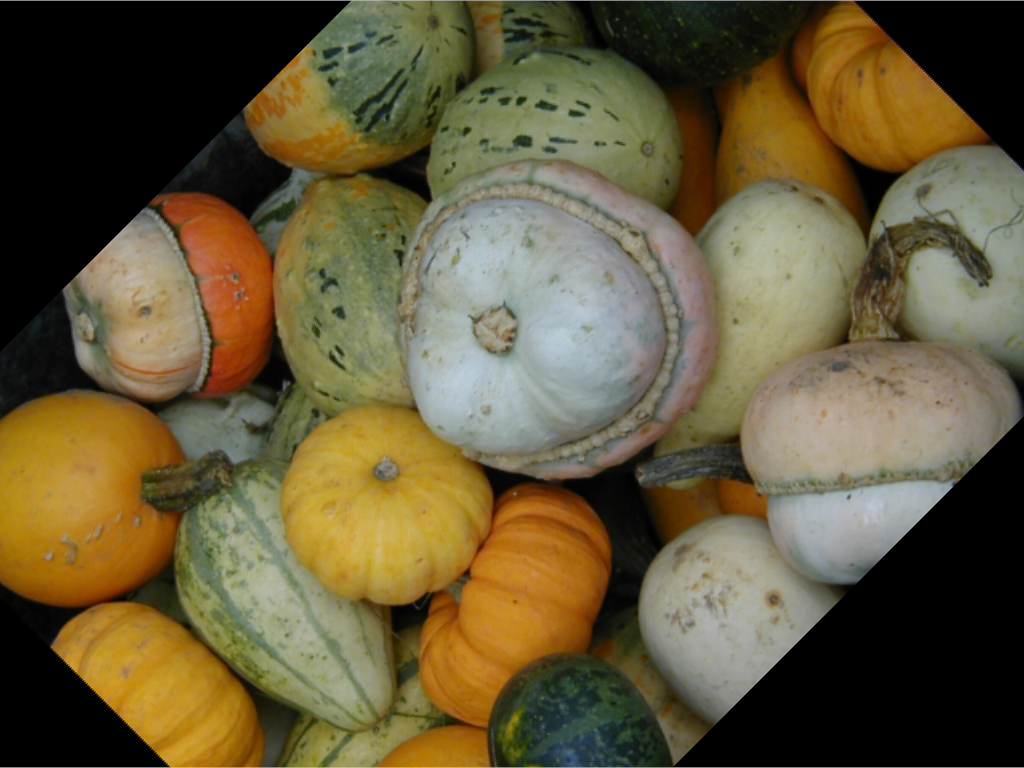
Rotate a photograph about its own center.
>>> import numpy as np
>>> import pyvista as pv
>>> from pyvista import examples
>>> gourds = examples.download_gourds()
>>> center = np.array(gourds.center)
>>> rotate = pv.Transform().translate(-center).rotate_z(45).translate(center)
Reslice the image onto its own grid through that rotation. The picture turns
but the samples do not move, so the output is still axis-aligned and the
corners the rotation vacated hold background_value.
>>> rotated = gourds.reslice(
...     gourds, 'linear', transform=rotate, background_value=0
... )
transform() cannot do this. It would turn
the grid along with the picture, leaving an image whose samples no longer
line up with the axes.
>>> pl = pv.Plotter()
>>> _ = pl.add_mesh(rotated, rgba=True, lighting=False)
>>> pl.view_xy()
>>> pl.camera.tight()
>>> pl.show()
Create a small image whose values are the x coordinate of each point.
>>> import numpy as np
>>> import pyvista as pv
>>> image = pv.ImageData(dimensions=(6, 6, 1))
>>> image['values'] = image.points[:, 0]
>>> image.bounds
BoundsTuple(x_min = 0.0,
            x_max = 5.0,
            y_min = 0.0,
            y_max = 5.0,
            z_min = 0.0,
            z_max = 0.0)
Create a reference image which covers part of it with half the spacing.
>>> reference = pv.ImageData(
...     dimensions=(6, 6, 1), spacing=(0.5, 0.5, 1.0), origin=(2.0, 1.0, 0.0)
... )
Reslice the image onto the reference.
>>> resliced = image.reslice(reference, 'linear')
The output has the reference’s geometry.
>>> resliced.dimensions
(6, 6, 1)
>>> resliced.origin
(2.0, 1.0, 0.0)
Since the image is sampled at the reference’s points, the values still equal the
x coordinate of the points they are stored at.
>>> bool(np.allclose(resliced['values'], resliced.points[:, 0]))
True
Give the reference a rotated direction_matrix to sample
an oblique plane. The output carries that orientation, and its values still sit at
the x coordinate they name.
>>> oblique = pv.ImageData(dimensions=(3, 3, 1), origin=(1.0, 1.0, 0.0))
>>> oblique.direction_matrix = pv.Transform().rotate_z(30).matrix[:3, :3]
>>> resliced = image.reslice(oblique, 'linear')
>>> bool(np.allclose(resliced.direction_matrix, oblique.direction_matrix))
True
>>> bool(np.allclose(resliced['values'], resliced.points[:, 0]))
True
Reference points outside the image are filled with background_value. This
reference samples at x = 2, 4, 6, 8, and the image ends at x = 5.
>>> reference = pv.ImageData(
...     dimensions=(4, 1, 1), spacing=(2.0, 1.0, 1.0), origin=(2.0, 0.0, 0.0)
... )
>>> resliced = image.reslice(reference, 'linear', background_value=-1.0)
>>> resliced['values'].tolist()
[2.0, 4.0, -1.0, -1.0]
Pass a transform to move the image before it is sampled. Shifting it two
along x brings two more of its values within reach of the same reference.
>>> shift = pv.Transform().translate((2, 0, 0))
>>> resliced = image.reslice(
...     reference, 'linear', transform=shift, background_value=-1.0
... )
>>> resliced['values'].tolist()
[0.0, 2.0, 4.0, -1.0]
See Also#
resampleChange an image’s dimensions and spacing in its own frame.
transform()Move an image without resampling it, by changing its
direction_matrixandorigininstead of its values.index_to_physical_matrixWhere an image’s samples sit in space.
sample()Probe any mesh at the points of another. It agrees with this filter, but also carries the reference’s own arrays and
vtkValidPointMask, and has none of the border, interpolation, or anti-aliasing options images need.interpolate()Interpolate values from one mesh onto another.
Used In#
Gallery Examples