load_frog_tissues#
- load_frog_tissues() ImageData[source]#
Load frog tissues dataset.
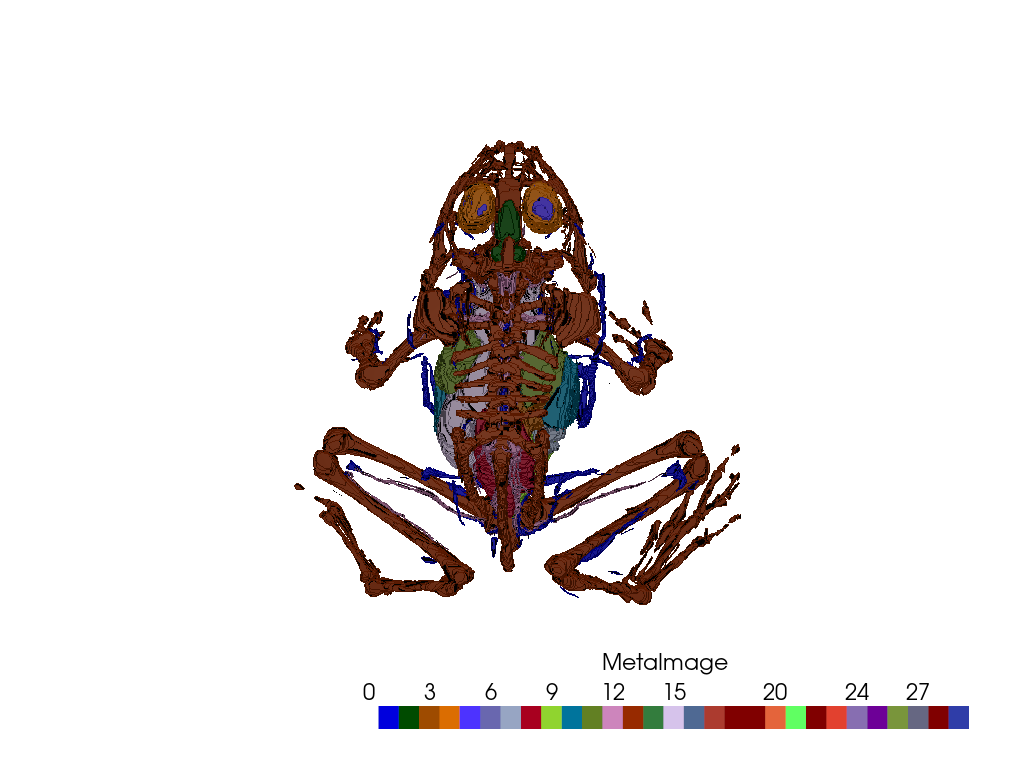
This dataset contains tissue segmentation labels for the frog dataset.
Added in version 0.44.0.
- Returns:
pyvista.ImageDataDataset.
Examples#
Download Python source code | Download Jupyter notebook
Load data
>>> import numpy as np
>>> import pyvista as pv
>>> from pyvista import examples
>>> data = examples.load_frog_tissues()
Plot tissue labels as a volume
First, define plotting parameters
>>> # Configure colors / color bar
>>> cmap = 'glasbey'  # Use a categorical colormap
>>> categories = True  # Give every tissue label its own color
>>> opacity = 'foreground'  # Make foreground opaque, background transparent
>>> opacity_unit_distance = 1
Set plotting resolution to half the image’s spacing
>>> res = np.array(data.spacing) / 2
Define rendering parameters
>>> mapper = 'gpu'
>>> shade = True
>>> ambient = 0.3
>>> diffuse = 0.6
>>> specular = 0.5
>>> specular_power = 40
Make and show plot
>>> pl = pv.Plotter()
>>> _ = pl.add_volume(
...     data,
...     ambient=ambient,
...     shade=shade,
...     diffuse=diffuse,
...     specular=specular,
...     specular_power=specular_power,
...     mapper=mapper,
...     opacity=opacity,
...     opacity_unit_distance=opacity_unit_distance,
...     categories=categories,
...     cmap=cmap,
...     resolution=res,
... )
>>> pl.camera_position = 'yx'  # Set camera to provide a dorsal view
>>> pl.show()
See Also#
- Frog Tissues Dataset
See this dataset in the Dataset Gallery for more info.
Used In#
API Examples
DataSetFilters.pack_labels(1 use)DataSetFilters.sort_labels(1 use)DataSetFilters.voxelize_binary_mask(1 use)
Gallery Examples